Basic network security using OpenBSD
- Keegan Brunk-Fraedrick
- May 19, 2022
- 5 min read

Updated: Jun 29, 2022
The OpenBSD operating system is distributed “Secure by Default” and as such even “... novice users of OpenBSD do not need to become security experts overnight" (openbsd.org/security.html). Because of this, most services are left disabled by default and techniques quickly fall out of the scope of this article. However there still is a need to configure basic security standards around network services, account permissions, and logging. These are only the basic first steps needed to harden OpenBSD and the scope of this article is limited to provide detailed and concise future articles (authentication methods, chroot jails, implementing security services, etc). It is assumed that a basic installation of OpenBSD has been performed following the steps in “Basic Installation of OpenBSD”. This article illustrates only the basic, general steps of hardening OpenBSD and does not take in account any specific applications of OpenBSD into consideration. Because of this, further hardening will most likely be required as per your use of OpenBSD and any inclusion of outside packages, libraries, or services. For more information on the installation, commands, and, processes of OpenBSD please refer to www.openbsd.org and https://man.openbsd.org/.
Overview
OpenBSD Resources
Configuring network security
Restricting command execution
Basic logging
Step 1: OpenBSD Resources
It is always best practice to first familiarize yourself with any system or application before actually using it. There is an incredible amount of resources available for anyone interested that cover a wide array of OpenBSD related topics. I would recommend to first start with the official OpenBSD documentation before considering any other source, as the documentation is both detailed and covers a breadth of topics.
OpenBSD Documentation: https://man.openbsd.org/afterboot https://man.openbsd.org/intro.8 https://www.openbsd.org/errata71.html https://www.openbsd.org/faq/pf/ https://man.openbsd.org/doas.conf.5 https://man.openbsd.org/sshd https://man.openbsd.org/help Step 2: Configuring network security
Start securing network communications by first editing the the configuration files for the SSH daemon (sshd) and Packet Filter (PF). A very flexible system native to OpenBSD capable of complex NAT and TCP/IP filtering. While configurations for PF can quickly become complicated, limiting network communications to only accepting designated protocols from specific IP address can serve as a introduction to writing basic rules.
Start by logging into the account User (using a console) and make a backup of the configuration file. As anyone who has ever experienced the joy of losing anything ever can tell you- it’s better to be safe than sorry.
#cp /etc/pf.conf /etc/examples/pf.conf
Reference current network settings.
#ifconfig

Assign a static IP address by editing the /etc/hostname.[interface] file.
#nano /etc/hostnames.vio0
Configure the settings to allow for IPv4 address (inet), set the static IP address (192.168.64.3), assign the subnet (255.255.224.0), and broadcast address (NONE), Then enable the interface (up).
Now setup the address for your gateway.
#touch /etc/mygate
#echo "192.168.64.1" > /etc/mygate
Reset the network.
#sh /etc/netstart
Move SSH services from the default port and configure basic security settings for the SSH daemon by editing the /etc/ssh/sshd_config file.
#nano /etc/ssh/sshd_config
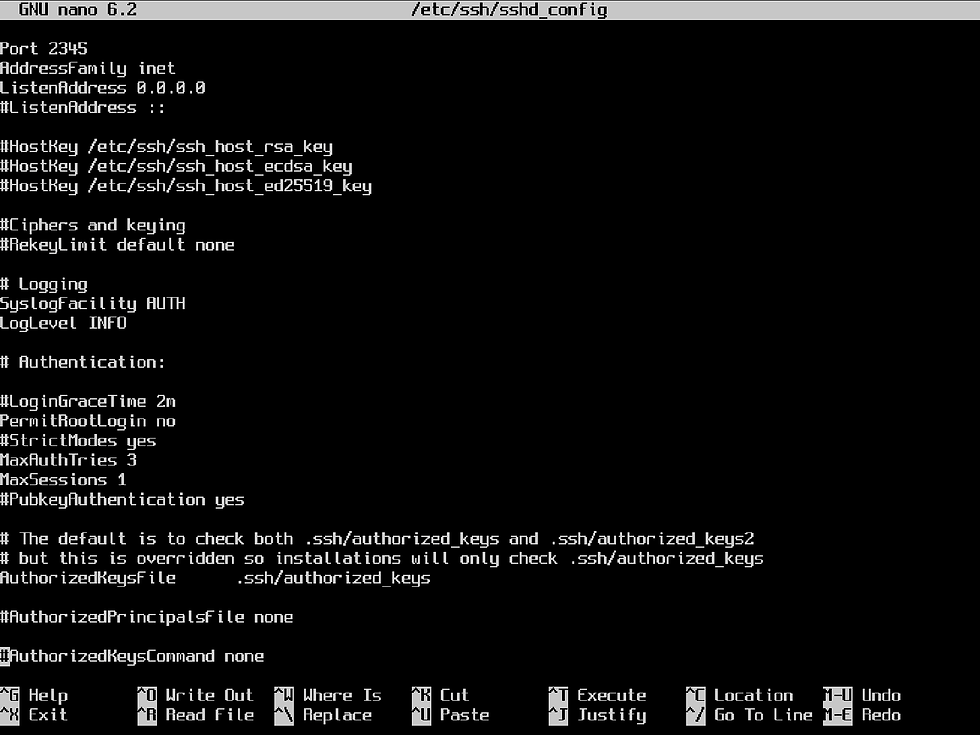
Disable default authentication for passwords by changing PasswordAuthentication and PermitEmptyPasswords to no.

Then set SSH access to a single IP address by using the match statement and
permit password authentication by using "Match Address" with the associated
authentication method.

*NOTE: This rule can be expanded to only allow specific users from the designated IP address to use SSH access. Passwords can also be changed to more secure alternatives by specifying different authentication methods.
Save and test the configuration (validation is silent with no errors present) .
#sshd -t
Implement a default-deny policy by editing /etc/pf.conf to block all traffic, ignore the loopback address, enable anti-spoofing, set the log interface, and reinforce the SSH connection policy (by only allowing tcp traffic from a static IP address). PF is enabled by default on OpenBSD. #doas nano /etc/pf.conf

The “egress” Interfaces specifies the default network interface(s) used by the
system and specific interfaces can be named in the same format. Write a rule that
passes traffic back into our system by pairing the action “pass” with the option of
“in/out”, while specifying the interface to be used (on egress), the type of traffic to be passed (proto tcp), where it’s going (from <ip addr> to any), and while enabling logging
for all traffic being passed out of the interface (log). *NOTE: Rules for Packet Filter are parsed sequentially Once direction, protocol type, and source/destination are configured for the allow
rules. Test the configuration for errors (validation is silent with no errors present) and then load the rules in PF. #pfctl -nf /etc/pf.conf #pfctl -f /etc/pf.conf As specified by “set logininterface egress”, packet and byte statistics are now
enabled and can be viewed by using the following command: #pfctl -s info
Step 3: Restricting external command execution
After steps have been taken to configure network security, external root login will be disabled. Which will force the use of another account over the IP address that was specified in both the sshd_config and pf.conf files.
Place further restrictions by removing the :wheel group and instead only allow specific commands to be executed per account use. *NOTE: Restricting commands like sudo and doas at this level serves to only reinforce security policies set elsewhere and SHOULD NOT be treated as standalone option.

Remove the :wheel group to set default deny policy for doas execution.
#nano /etc/group
Edit the /etc/doas.conf file to restrict command execution to specific commands for designated accounts. Configure rules that deny before writing rules that permit, as the doas.conf file (much like pf.conf) will read these rules sequentially.
Configure this file to restrict doas command usage by only allowing specific commands to be ran on a per-user basis. This can be accomplished by following the format below to specify which command (by what user) can be executed.
#nano /etc/doas.conf

*Note: Absolute paths for commands can be used by replacing the command name with the path. For more information please refer to doas.conf(5) Once the desired allowances are placed within the /etc/doas.conf file, test the syntax of the configuration file and then test doas command restriction. #doas -C /etc/doas.conf If no error messages are thrown, then configuration is validated. Log into a doas
configured account and test doas command execution. #su User
#doas tcpdump Now only the specified commands (and arguments) are available for use by the specified users! *Note: Specified commands should be carefully considered as there are many ways to escalate privileges.
Step 4: Basic logging With logging enabled for both Packet Filter and the SSH daemon (as specified in
both configuration files), network access over SSH and packets logged with PF will now be present in the /var/log/ directory. Among these files are also logs of doas command usage (~/secure), daemon activities (~/daemon), system messages (~/messages), authentication (~/authlog), account creation (~/adduser), ftp traffic (~/xferlog), log file for anonymous downloads (~/ftpd), login account records (~/wtmp), mail logs (~/mail), printer daemon information (~/lpd-errs), and logs for the rdist program (/var/log/rdist/) can be found. Remaining logs can be accessed with the commands below:
Login records #last -f /var/log/wtmp Failed login records #last -f /var/log/failedlogin Logs mailed by the cronjob daily #last -f /var/log/daily.out System security logs
#last -f /var/log/security.out
Packets logged by PF in a binary format #tcpdump -n -e -ttt -r /var/log/pflog View a real-time display of packets logged by the pflog0 interface #tcpdump -n -e -ttt -i pflog0 Basic network security settings are now configured by only allowing ssh traffic from the assigned IP address, with connection policies reinforced in PF, and restrictions placed on the doas command usage.
Comments